 MetaMask

SonarQube-Part1
- sivaprasad.spch@gmail.com
- January 8, 2026
- No Comments
1. What is SonarQube?
• 1.1 Backend & Access
2. What Does SonarQube Do?
• 2.1 Scans Your Code Automatically
• 2.2 Detects Quality Issues
• 2.3 Enforces Coding Standards
• 2.4 Checks for Unit Test Coverage
• 2.5 Gives Code Ratings (A to E)
• 2.6 Shows a Visual Dashboard
• 2.7 Quality Gates Block Bad Code
• 2.8 Shows Time to Fix Each Issue
3. Similar Tools to SonarQube
4. Installation Steps (RHEL / EC2)
• 4.1 Connect to EC2
• 4.2 Switch to Root
• 4.3 Fix Time Sync (Avoid GPG Errors)
• 4.4 Install Java 17 (Amazon Corretto)
• 4.5 Set Required Kernel Parameters
• 4.6 Install Required Packages
• 4.7 Download and Extract SonarQube
• 4.8 Create a Dedicated User
• 4.9 Configure Environment for sonar User
• 4.10 Start SonarQube
5. Access SonarQube
SonarQube – A Complete Guide to Code Quality Management
Introduction
In modern software development, writing code that works is not enough. The code must also be secure, maintainable, readable, and testable. This is where SonarQube plays a crucial role.
SonarQube is an open-source platform for continuous inspection of code quality. It performs static code analysis to detect bugs, vulnerabilities, code smells, and other quality issues before the code reaches production.
What is SonarQube?
SonarQube is a Continuous Code Quality tool developed by SonarSource. It continuously analyzes source code and provides detailed reports on code quality and security.
Key Characteristics
Type: Continuous Code Quality Platform
Vendor: SonarSource
Open Source: Yes (Community Edition supports limited languages)
Latest Version: 9.x
Supported OS: Cross-platform (Linux, Windows, macOS)
Execution: Not an executable installer — download ZIP and extract
Initial Language Support: Java (now supports many languages)
Download Link:
https://www.sonarsource.com/products/sonarqube/downloads/
Why SonarQube is Important?
SonarQube helps development teams to:
Detect issues early in the development lifecycle
Maintain consistent coding standards
Improve application security
Reduce technical debt
Prevent poor-quality code from reaching production
With Quality Gates, SonarQube can even block deployments if code does not meet predefined standards.
Key Features of SonarQube
1. Code Quality and Security
Bugs and Vulnerabilities
Identifies logical errors and potential security risks.
Helps prevent runtime failures and security breaches.
Code Smells
Detects maintainability issues.
Highlights bad coding practices that may not break the code. immediately but cause problems later.
Code Coverage
Measures how much of the code is tested using unit tests.
Encourages better test coverage.
Duplication
Detects duplicate code blocks.
Helps reduce redundancy and maintenance effort.
Technical Debt
Estimates the time required to fix all identified issues.
Helps teams prioritize improvements.
2. Multi-Language Support
SonarQube supports a wide range of programming languages, including:
Java
JavaScript
C / C++
C#
Python
PHP
Go
Kotlin
Ruby
Many more
Initially developed for Java, SonarQube has evolved into a multi-language platform.
3. Quality Gates
Quality Gates are a set of conditions that the code must satisfy before it is merged or deployed.
Examples:
Code coverage must be ≥ 80%
No critical vulnerabilities
No new code smells
If these conditions fail, the build or deployment can be stopped automatically.
Similar Tools to SonarQube
There are many tools in the market that focus on code quality, security, and static analysis:
Checkmarx
Coverity
Fortify Static Code Analyzer (SCA)
Veracode
PMD
ESLint
SpotBugs / FindBugs
StyleCop
Pylint
ReSharper
Flake8
Codacy
CodeClimate
DeepSource
Semmle LGTM
Klocwork
Infer
Bandit
RuboCop
Brakeman
Each tool has its own focus area, but SonarQube stands out due to its centralized dashboard and Quality Gate concept.
Code Coverage vs Code Review
Code Coverage
Code coverage measures the percentage of source code that is executed by unit tests.
Example:
If 80 out of 100 lines are tested → 80% coverage
Key Points
Industry standard target: 80%
Helps identify untested code paths
Improves confidence in test suites
Tools
JaCoCo (Java)
Cobertura
Istanbul (JavaScript)
Code Review
Code review is a manual process where developers review each other’s code to ensure:
Correctness
Coding standards
Readability
Best practices
Performance optimizations
Benefits
Reduces bugs
Improves team collaboration
Enforces standards
Improves overall code quality
Tools
GitHub Pull Requests
GitLab Merge Requests
Bitbucket PRs.
Key Difference
| Aspect | Code Coverage | Code Review |
|---|---|---|
| Type | Automated metric | Manual process |
| Focus | Tested code | Code quality & logic |
| Tools | JaCoCo, Cobertura | GitHub, GitLab |
| Goal | Identify untested areas | Improve correctness and standards |
More Information About SonarQube
Previously known as Sonar
Continuously analyzes source code
Generates reports in HTML and PDF formats
Supports multiple operating systems
Works with multiple browsers (Chrome, Edge, Safari, IE)
Supports databases like:
Oracle
PostgreSQL
MS SQL Server
Uses H2 database by default (for evaluation)
Issues Identified by SonarQube
Duplicate code
Coding standard violations
Missing unit tests
High complexity
Lack of comments
Potential bugs (e.g., poor exception handling).
Prerequisites for SonarQube Installation
1. Hardware Requirements
CPU: Modern multi-core processor
RAM:
Minimum: 2GB
Recommended: 4GB (t2.medium for AWS)
Disk Space:
1GB for installation
Additional space for database
2. Software Requirements
Operating System
Linux (preferred)
Windows
macOS
Java
Java JDK 11 or JDK 17
JRE is not sufficient
JAVA_HOMEmust be set
Database Support
Oracle
PostgreSQL (recommended)
MS SQL Server
MySQL (removed in newer versions)
Note:
H2 is an in-built database and can be used for testing, but not recommended for production.
Conclusion
SonarQube is a powerful tool for maintaining high-quality, secure, and maintainable code. By integrating SonarQube into CI/CD pipelines, teams can ensure that only clean and reliable code reaches production.
It complements code reviews and test coverage, making it an essential tool in modern DevOps and Agile environments.
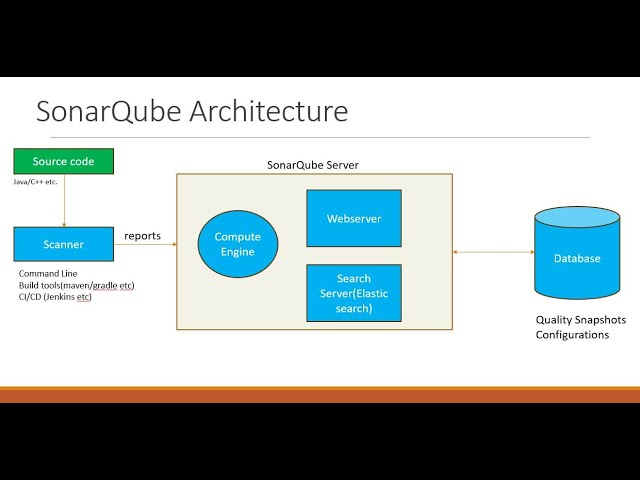
SonarQube 9.6.1 Installation on RHEL 10 (AWS EC2 – t2.medium)
Maintaining high code quality is critical in modern software development, and SonarQube is one of the most widely used platforms for continuous code quality inspection. This guide walks through the step-by-step installation of SonarQube 9.6.1 on a Red Hat Enterprise Linux (RHEL) 10 EC2 instance, following best practices recommended for production-like environments.
Why This Setup?
SonarQube Version: 9.6.1 (LTS)
OS: Red Hat Enterprise Linux 10
Instance Type: t2.medium (minimum 4 GB RAM)
Java Version: Java 17 (Amazon Corretto)
Use Case: Evaluation, learning, or small-scale environments
⚠️ Note: For large production environments, an external PostgreSQL database and higher instance types are recommende.
Prerequisites
Before starting the installation, ensure the following requirements are met:
EC2 Requirements
Instance type: t2.medium or higher
RAM: Minimum 4 GB
Internet access enabled
Open Security Group Ports
22 – SSH access
9000 – SonarQube web interface
Software Requirements
RHEL 10
Java JDK 17 (required)
wgetandunzipStep 1: Connect to the EC2 Instance
Step 1: Connect to the EC2 Instance
Connect to your EC2 instance using SSH:
ssh -i your-key.pem ec2-user@<your-ec2-public-ip>
Step 2: Switch to Root User
Most installation steps require root privileges:
sudo su -
Step 3: Fix Time Synchronization (Avoid GPG Errors)
Incorrect system time can cause package signature and repository errors. Enable NTP and sync the clock:
timedatectl set-ntp true

timedatectl set-timezone UTC

systemctl restart chronyd || systemctl restart systemd-timesyncd

timedatectl
Ensure NTP synchronization is active.
Step 4: Install Java 17 (Amazon Corretto)
SonarQube 9.6.1 requires Java 11 or 17. Java 17 is recommended.
rpm --import https://yum.corretto.aws/corretto.key

curl -Lo /etc/yum.repos.d/corretto.repo https://yum.corretto.aws/corretto.repo

yum install -y java-17-amazon-corretto-devel --nogpgcheck
Step 5: Set Java 17 as Default
If multiple Java versions are installed, configure Java 17 as the default:
alternatives --config java
Select:
/usr/lib/jvm/java-17-amazon-corretto/bin/java
Step 6: Configure Kernel Parameters
SonarQube uses Elasticsearch internally, which requires higher virtual memory limits.
sysctl -w vm.max_map_count=262144
echo 'vm.max_map_count=262144' >> /etc/sysctl.conf
This setting is mandatory; SonarQube will not start without it.
Step 7: Install Required Packages
Install utilities needed for downloading and extracting SonarQube:
yum install wget unzip -y
Step 8: Download and Extract SonarQube
Navigate to /opt and download SonarQube 9.6.1:
cd /opt

wget https://binaries.sonarsource.com/Distribution/sonarqube/sonarqube-9.6.1.59531.zip

unzip sonarqube-9.6.1.59531.zip
mv sonarqube-9.6.1.59531 sonarqube
Step 9: Create a Dedicated SonarQube User
For security reasons, SonarQube must not run as root.
useradd sonar
echo 'sonar   ALL=(ALL)       NOPASSWD: ALL' >> /etc/sudoers
chown -R sonar:sonar /opt/sonarqube
chmod -R 775 /opt/sonarqube
Step 10: Configure Java Environment for sonar User
Switch to the sonar user su - sonar
Add Java environment variables to .bashrc:
echo 'export JAVA_HOME=/usr/lib/jvm/java-17-amazon-corretto' >> ~/.bashrc
echo 'export PATH=$JAVA_HOME/bin:$PATH' >> ~/.bashrc
source ~/.bashrc
Verify Java version:
java -version
Expected output:
openjdk version "17"
Step 11: Start SonarQube
Navigate to the SonarQube startup script and start the service:
cd /opt/sonarqube/bin/linux-x86-64/

sh sonar.sh start

sh sonar.sh status
If started successfully, SonarQube will run in the background.
Step 12: Access SonarQube Web Interface
Open your browser and navigate to:
http://<your-ec2-public-ip>:9000
Default Login Credentials
Username: admin
Password: admin
You will be prompted to change the password on first login.
Optional: Troubleshooting SonarQube Startup Issues
If SonarQube fails to start, check the logs:
tail -n 100 /opt/sonarqube/logs/sonar.log
tail -n 100 /opt/sonarqube/logs/es.log
Common Issues
Insufficient memory
Incorrect Java version (Java 21 is not supported)
vm.max_map_countnot configuredRunning SonarQube as root
Important Notes
❌ Do not run SonarQube as root
✅ Java 17 is recommended for SonarQube 9.6.1
⚠️ H2 database is for evaluation only (not production)
🛑 SonarQube will fail if system memory is insufficient.
Conclusion
By following this guide, you have successfully installed SonarQube 9.6.1 on RHEL 10 running on an AWS EC2 t2.medium instance. This setup is ideal for learning, demos, and small-scale projects. Integrating SonarQube with CI/CD pipelines will further enhance your code quality and security practices.
*** Shell Script ***
#!/bin/bash
set -e
echo “========== SonarQube 9.6.1 Installation Started ==========”
# —————————–
# Variables
# —————————–
SONAR_VERSION=”9.6.1.59531″
SONAR_USER=”sonar”
SONAR_HOME=”/opt/sonarqube”
JAVA_HOME_PATH=”/usr/lib/jvm/java-17-amazon-corretto”
# —————————–
# 1. Time Synchronization
# —————————–
echo “Configuring time synchronization…”
timedatectl set-ntp true
timedatectl set-timezone UTC
systemctl restart chronyd || systemctl restart systemd-timesyncd
# —————————–
# 2. Install Java 17 (Amazon Corretto)
# —————————–
echo “Installing Java 17 (Amazon Corretto)…”
rpm –import https://yum.corretto.aws/corretto.key
curl -Lo /etc/yum.repos.d/corretto.repo https://yum.corretto.aws/corretto.repo
yum install -y java-17-amazon-corretto-devel –nogpgcheck
# —————————–
# 3. Set Java 17 as Default
# —————————–
echo “Setting Java 17 as default…”
alternatives –set java ${JAVA_HOME_PATH}/bin/java
# —————————–
# 4. Kernel Parameters
# —————————–
echo “Setting vm.max_map_count…”
sysctl -w vm.max_map_count=262144
grep -q “vm.max_map_count” /etc/sysctl.conf || echo “vm.max_map_count=262144” >> /etc/sysctl.conf
# —————————–
# 5. Install Required Packages
# —————————–
echo “Installing required packages…”
yum install -y wget unzip
# —————————–
# 6. Download and Extract SonarQube
# —————————–
echo “Downloading SonarQube ${SONAR_VERSION}…”
cd /opt
wget -q https://binaries.sonarsource.com/Distribution/sonarqube/sonarqube-${SONAR_VERSION}.zip
unzip -q sonarqube-${SONAR_VERSION}.zip
mv sonarqube-${SONAR_VERSION} sonarqube
# —————————–
# 7. Create Sonar User
# —————————–
echo “Creating sonar user…”
id ${SONAR_USER} &>/dev/null || useradd ${SONAR_USER}
echo “${SONAR_USER} ALL=(ALL) NOPASSWD: ALL” >> /etc/sudoers
chown -R ${SONAR_USER}:${SONAR_USER} ${SONAR_HOME}
chmod -R 775 ${SONAR_HOME}
# —————————–
# 8. Configure Java for Sonar User
# —————————–
echo “Configuring JAVA_HOME for sonar user…”
su – ${SONAR_USER} <<EOF
grep -q JAVA_HOME ~/.bashrc || echo “export JAVA_HOME=${JAVA_HOME_PATH}” >> ~/.bashrc
grep -q PATH ~/.bashrc || echo “export PATH=\\\$JAVA_HOME/bin:\\\$PATH” >> ~/.bashrc
source ~/.bashrc
java -version
EOF
# —————————–
# 9. Start SonarQube
# —————————–
echo “Starting SonarQube…”
su – ${SONAR_USER} <<EOF
cd ${SONAR_HOME}/bin/linux-x86-64
sh sonar.sh start
sh sonar.sh status
EOF
# —————————–
# Completion Message
# —————————–
echo “====================================================”
echo ” SonarQube 9.6.1 installation completed successfully “
echo ” Access URL: http://<EC2-PUBLIC-IP>:9000 “
echo ” Default Login -> admin / admin “
echo “====================================================”
How to Use the Script
chmod +x install_sonarqube_9.6.1.sh
sudo ./install_sonarqube_9.6.1.sh